
Click on the attached link http://hub.dexus.com/Pages/Forms.aspx
The link should be able to be viewed on your screen - as Pages - Forms or may open directly
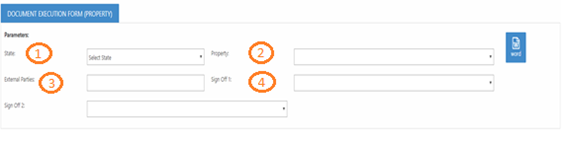
- Select the State using the drop-down Menu
- Select the Property using the drop-down menu
- Type the name of the Tenants
- The Sign off 1 and Sign off 2 list of names is generated by the allocation, this is not managed by the Records and Knowledge Management Team If the name of the staff member is not on the allocation list due to staff movement, select any staff member and then amend in the word document
- Select the word Icon
- The Word Document will download and will be named Main in the bottom of your screen
- Open the Word Document
- Complete the Description of Documents and the No of Documents
- Answer Questions 1, 2 & 3
- Legal sign off is normally provided in a covering letter, Application's should be N/A, as Applications generally do not require legal sign off
- Sign and date the fields for commercial approval, if you have date and name stamps please use them.
- Save the DEF in a word format so the records team can amend to add the document tracking number and will check the signing clauses
- Send the DEF along with the accompany documents to the Records and Knowledge Management Team docs@dexus.com
Comments
0 comments
Please sign in to leave a comment.